Thursday, August 11, 2011

How to Sign in into different gmail accounts in same browsers ?


Using Different Gmail Accounts from same Browser

You can sign in to your different Gmail Accounts with a single click.
You just have to activate there service for Multiple Accounts which is free.

Steps to be Followed:

1. Go to Google Account Setting.
2. Enable Multiple Account setting under Personal Setting.
3. Now Sign out
4. Again Sign in
5. Now at top right see email changing Option.
--

MoHaN.K.RaJ
MCA,GVP,VIZAG,
+91 91777 50037

Remove Password And Other Restrictions From PDF Documents


Remove Password And Other Restrictions From PDF Documents:
Here's a site that can remove almost all the restrictions from protected PDF documents. The site is FreeMyPDF.com. Using freemypdf is very easy. Just upload your protected PDF file to the site and click on the button that says do it.

FreeMyPDF if a great service but it has a few limitations:

1. The maximum file size allowed is 7MB. So if you PDF document's size is more then 7MB, then this will not work. Try pdfpirate in this case.

2. There are two kinds of restrictions on PDF documents. First, where you can't even open a PDF file without a password. And second, where you can open a PDF file without any password, but you can't select, copy or print without entering a password. FreeMyPDF can remove only second kind of passwords. So if you are looking for something that can help you to open a pdf document without a password, then FreeMyPDF is not for you.

--

MoHaN.K.RaJ
MCA,GVP,VIZAG,
+91 91777 50037

How to get rid of an HTML Script Virus?


HTML/Infected.WebPage.Gen is a file containing HTML script that, once downloaded to your computer, can perform various malicious acts, such as deleting files, disabling programs, slowing your computer and downloading additional malware (malicious software). Fortunately, you can remove HTML/Infected.WebPage.Gen without going out and buying an expensive anti-virus program if your computer has the Windows Vista or Windows 7 operating systems.

Instructions:
   
End Processes :
  • Press "Ctrl" + "Shift" + "Delete" to open the Windows Task Manager.
  • Click on the "Processes" tab of the Windows Task Manager.
  • Click on the "Show Processes From All Users" button at the bottom of the Task Manager.
  • Right-click on "HTML/Infected.WebPage.Gen" and select "End Process."
  • Close the Windows Task Manager.
Delete Registry Entries:
  • Click on the "Start" menu, type "regedit" into the "Search Programs and Files" box and press "Enter" to open the Registry Editor.
  • Right-click on "HKEY_LOCAL_MACHINE\Software\HTML/Infected.WebPage.Gen" and select "Delete."
  • Close the Registry Editor.

Delete Files:

  • Click on the "Start" menu and type "HTML/Infected.WebPage.Gen\HTML/Infected.WebPage.Gen.exe" into the "Search Programs and Files" box.
  • Delete all of the matching files that appear in the "Results List." To delete a file, right-click on it and select "Delete." Note that these files may have different extensions, such as "HTML/Infected.WebPage.Gen\HTML/Infected.WebPage.Gen.dll" or "HTML/Infected.WebPage.Gen\HTML/Infected.WebPage.Gen.gif."
  • Restart your computer.

--

MoHaN.K.RaJ
MCA,GVP,VIZAG,
+91 91777 50037

Every time give a new email id to your friends

Now Friends the very first Trick Of Gmail that I Love the most.
So, it goes like this, say you have a email id bestfriends@gmail.com
If Your Friends wants to send you a mail then they will send it at this email address.
 

Now, Let there be three friends of yours, there may be many, just talk about three at present
Manoj
Vinod
Ganesh
 

If you want to give your friends a unique email id
For
Manoj It could be bestfriends+Manoj@gmail.com
For
Vinod It could be bestfriends+Vinod@gmail.com
For
Ganesh It could be bestfriends+Ganesh@gmail.com

So, its simple you could add anything after the initial mail by adding a "+" sign.
As all these Email Addresses
bestfriends+Manoj@gmail.com,bestfriends+Vinod@gmail.com and bestfriends+Ganesh@gmail.com are the same as bestfriends@gmail.com

If you have a girlfriend then impress her that how much you love her by showing her name in mail id.


--

MoHaN.K.RaJ
MCA,GVP,VIZAG,
+91 91777 50037

Is your Computer Male or Female

Is your Computer  Male or Female?
To find out the gender of your computer follow these instructions
 
 Open Notepad.
  Copy and paste CreateObject("SAPI.SpVoice").Speak"Hello your name"
 Save as computer_gender.vbs
 Run the file.


If you hear a male voice, you have a boy.
If you hear a female voice, you have a girl.


--

MoHaN.K.RaJ
MCA,GVP,VIZAG,
+91 91777 50037

My Computer does not detect pen drives and other USB devices like iPod or external hard drive


If none of your USB devices detect ,this could be due to wrong registry entries. i.e you need to delete UpperFilters and the LowerFilters registry values.

Follow the procedure listed below to correct your registry:


1. Open Start >> Run, and type "regedit" (without double quotes), and click OK.


2. Locate UpperFilters registry value. it resides in the following registry subkey:

HKEY_LOCAL_MACHINE\SYSTEM\CurrentControlSet\Control\Class\{4D36E980-E325-11CE-BFC1-08002BE10318}


3. Click on Edit menu, and select Delete and click OK.
Note: If you receive an error when you try to delete the registry subkey, you may not have correct permissions to edit the subkey.


4. Locate LowerFilters registry value. It resides in the following registry subkey:

HKEY_LOCAL_MACHINE\SYSTEM\CurrentControlSet\Control\Class\{4D36E967-E325-11CE-BFC1-08002BE10318}


5. Click on Edit menu, and select Delete and click OK.
 

6. Exit Registry Editor and restart your system.

--

MoHaN.K.RaJ
MCA,GVP,VIZAG,
+91 91777 50037

Friday, August 5, 2011

Tips to Conserve Laptop Battery Power in Windows 7

The world is getting more mobile day by day and to keep the pace you need power in your batteries. But it has a limitation, you need to charge it again and again to keep them running.

Although Windows 7 has many power management improvements, and while the Power Efficiency Diagnostic Tool in Windows 7 can give you a lot of power optimization tips, laptop batteries are still not as efficient as we'd like them to be. They can maximum hold power for 5-6 hours only. So, do you want to maximize the efficient use of battery?

The trick is to squeeze the most out of the power that's available. Here are these few tricks which will improve the battery performance in a dramatic way.

The most common tip, if you have time to do only one thing:

Use the Power saver power plan to maximize your battery life. (To choose the Power saver plan, open Power Options in Control Panel.)

Some other ways to help stretch your computer's battery life:

Choose a power saving power plan

A power plan is a collection of hardware and system settings that control how your laptop manages power. Windows 7 has two default plans:

  • Balanced: Offers full performance and display brightness when you need it, but conserves power when the computer is idle.
  • Power saver: The best choice for extending battery life. The cost? Slower performance and lower display brightness.
  • Your computer manufacturer might offer additional plans as well.
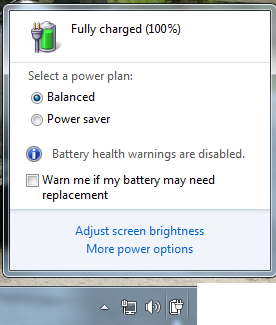
  1. To change your power plan click the battery meter icon in the notification area of the Windows taskbar.
  2. Battery meter showing power plans. Select one of the default power plans: Balanced or Power saver26 Jul 11 7 27 50 PM1 Tips to Conserve Battery Power and Extend or Prolong Battery Life in Windows 7
  3. You can also create your own custom power saver plans by using More power options.

Reduce display brightness

Display is the most power consuming part of a computer—even more than a hard disk and CPU. Most of the laptops come with dedicated keys to control the brightness and contrast ratio of the display. You can also adjust the display brightness from Power Options in Control Panel.

Decrease time for Windows dims and turns off the display

You can save power by having Windows dim and then turn off the display after a period of inactivity. You can save more power if you decrease the time and increase the efficiency of battery.

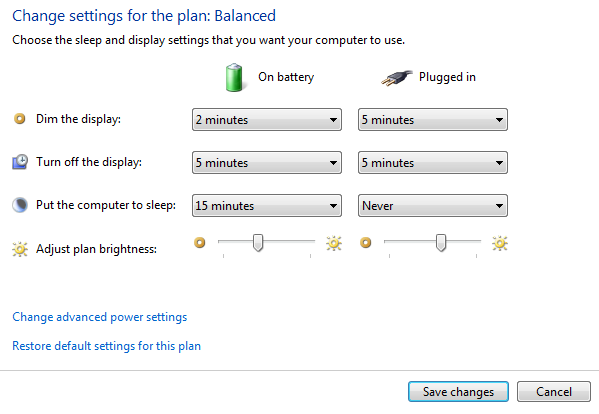
To choose when Windows dims and turns off the display

  1. Click battery icon in notification area and click on More Power Options.
  2. On the Select a power plan page, on the left, click Choose when to turn off the display26 Jul 11 7 26 25 PM Tips to Conserve Battery Power and Extend or Prolong Battery Life in Windows 7
  3. Doing this adjusts settings only for the plan that you're currently using. To change settings for another plan, click Change plan settings next to the plan that you want to change.
  4. Click Save changes.

Turn off or remove devices that you aren't using

Many USB devices use power just by being connected. If you use a USB mouse, you can save power by disconnecting the mouse and by using a touch pad. If you use a USB flash drive, unplug it when you're not using it.

Turn off PC cards and integrated wireless devices

These devices also use power. If you don't need them, turn them off.

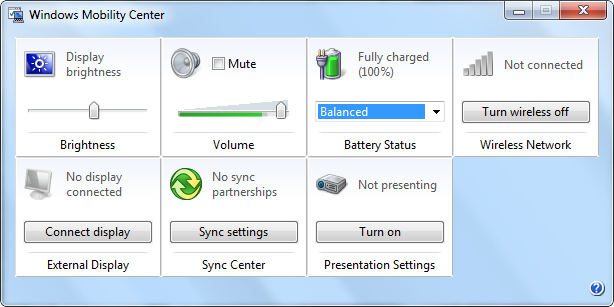
You can use Windows Mobility Center to manage most of these options. To open WMC, Click Start and type Windows Mobility center and click on the first result.

26 Jul 11 7 25 01 PM 600x300 Tips to Conserve Battery Power and Extend or Prolong Battery Life in Windows 7

If you know any other good tricks, do share with us!


--

MoHaN.K.RaJ
MCA,GVP,VIZAG,
+91 91777 50037

How to find out who is using your wireless network

Do you suspect that someone is wrongfully using your wireless network connection? Maybe your wireless connection is slow these days and you suspect that someone has hacked into it. Well, there are several free tools available which can help you detect who is using your connection illegally. I am covering two tools here, but if you know of any more, please do share below in the comments.

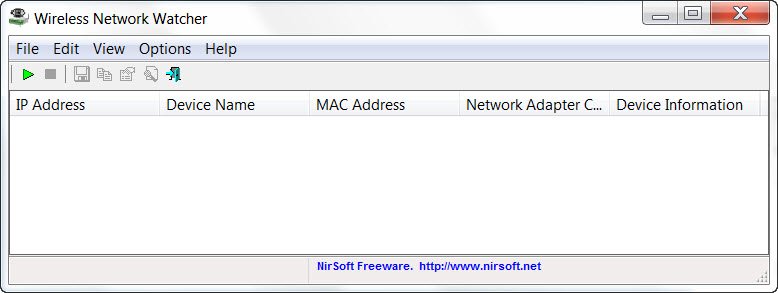
network watcher 400x150 How to find out who is using your wireless network

Wireless Network Watcher is the 3rd new tool released by Nirsoft, this month. It is a small utility that scans your wireless network and displays the list of all computers and devices that are currently connected to your network.

It will display the following information for each connection:

  1. IP address
  2. MAC address
  3. Manufacturer of the network card
  4. Computer name
  5. Device Name.

The tool also allows you to export the list of connected devices and save it as an html,xml, csv or a text file.

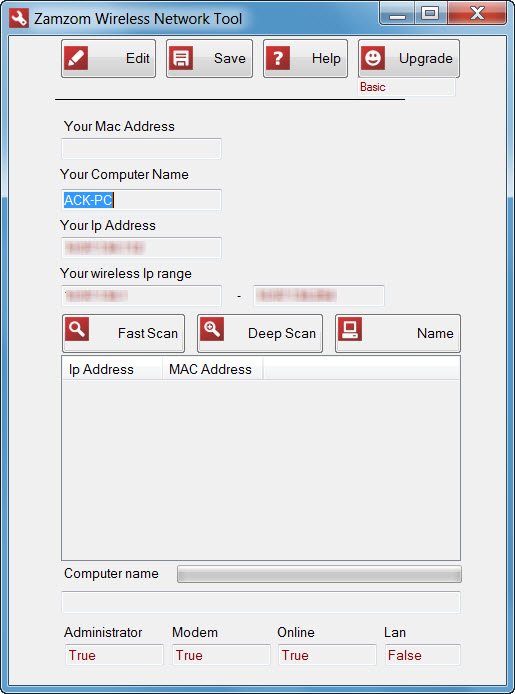
Another utility for sniffing if someone else is using your wireless network is Zamzom.

wireless network tool 445x600 How to find out who is using your wireless network

Zamzom Wireless Network Tool lets you see all  the users that are using your wireless network. There are two scan options but only the Fast Scan is available in the free version, but that should be good enough for most, I suppose. Once the scan is completed, it displays the IP address and MAC address.


--

MoHaN.K.RaJ
MCA,GVP,VIZAG,
+91 91777 50037

Bitdefender Internet Security 2012 Free

We at The Windows Club are always striving to offer you the best paid software for free and we are always thankful to the companies who graciously offer their licenses free to our readers. This week we have an exciting giveaway for you: 10 licenses of Bitdefender Internet  Security 2012.

bitdefender 2012 600x402 Giveaway: Get Bitdefender Internet Security 2012 FREE

The latest and the best, Bitdefender Total Security 2012 is one of the finest security software available for the Windows operating system. The product is sleek, silent and effective in dealing with threats from hackers, viruses, and identity theft attacks.

Bitdefender Internet Security 2012 boasts a completely overhauled user interface and has been designed to meet the demands of computer users that require protection to work 24/7 without interrupting their work and enjoyment.

Key new features include social networking protection, an Autopilot mode and scan dispatcher to maintain system performance.

The new social networking security feature will filter and block social-networking specific e-threats by scanning the links users receive from friends on Facebook, whilst also monitoring and advising on privacy settings.

Bitdefender Internet Security 2012 costs $49.95 but 10 single-PC, 1-year licenses are being offered here free to TWC readers.

To win a license of this fine internet security suite, you have to do two things:

1. Download its trial version from here and let us know which one new feature you like the best. The more original your answer, the more your chances

2. Share the following on any social site like Twitter, Facebook, Google+, etc and post its status URL here.

Giveaway: Check out the new @Bitdefender Internet Security Suite, 2012 at http://bit.ly/qUMVJV – and win a free license!

Share on multiple social sites and you increase your chances.

Incidentally, I wonder if you have had a look at the new brand identity that BitDefender has created for themselves. Quite cool I must say! Visit its home page to have a look at the transformation!

nw bitdefender logo 400x138 Giveaway: Get Bitdefender Internet Security 2012 FREE

The giveaway will remain open for 7 days, and the winners declared thereafter. The licenses will be forwarded to the winners by me.


--

MoHaN.K.RaJ
MCA,GVP,VIZAG,
+91 91777 50037

Thursday, June 16, 2011

Top 10 downloads of the past 10 years

By Kelly Green Morrison and Karen Whitehouse, Download.com
When CNET Download.com opened its doors in 1996, it was home to 3,000 small shareware and freeware applications. Online software distribution was still in its infancy. What a difference a near-decade makes! Since 1996, we've watched the rise of instant messaging, digital audio and the MP3 format, file sharing, spyware and antispyware, and the open-source movement, just to name a few. And we've watched as online software distribution has gone from pipe dream to reality. These 10 applications best represent the top trends in downloading over the past decade.

ICQ

Today instant messengers are ubiquitous, but when ICQ ("I Seek You") was first released in 1997, it was truly the first of its kind. Though competitors such as Yahoo Instant Messenger and AIM have since encroached on ICQ's territory, this chat client remains enormously popular with international users, and it has remained one of Download.com's most popular applications since its launch.

Winamp

Arriving fast on the heels of the emerging MP3 digital format, Nullsoft's Winamp was one of the darlings of the burgeoning digital audio scene in the late '90s. This free audio player quickly gained popularity, becoming one of the most popular files on Download.com, and Nullsoft was eventually acquired by AOL in 1999.


Napster
Who doesn't remember this controversial file-sharing kingpin? Developed by Northeastern University student Shawn Fanning, Napster was a groundbreaking application that enabled users to share MP3s painlessly for the first time through a peer-to-peer network. Napster has since been sued, shuttered, and reborn as a subscription music service, but its legacy remains.
Firefox
Developed by the open-source Mozilla project in 2003, Firefox was the first browser to show the promise of breaking Microsoft's stranglehold on the browser market. Lightweight, secure, and packed with useful features, Firefox exemplifies the promise of the strengthening open-source movement.

WinZip
When CNET Download.com launched in 1996, WinZip was among the first programs in our library, and in the past nine years, it has remained near the top of our Most Popular list. The reason is simple: For many years, WinZip was an essential utility. You couldn't download or send large files without it. Even the fact that Windows XP now has built-in ZIP support hasn't diminished its popularity. The keys to WinZip's success are its simplicity and its singularity of purpose: it does one thing--compressing and decompressing files--and it does it very well.
iTunes
Apple's music player and organizer makes our top 10 list for the sheer beauty of its product design. iTunes is not only a full-featured media player and library in its own right, it's also the gateway for Apple's iPod and popular music store, creating an elegant and simple interface for buying and organizing music. If only all software were this easy to use.
Ad-aware
Almost as soon as there was software to download, there was adware coming along for the ride. Lavasoft did its part to hold the line with Ad-aware, a spyware scanner and remover. Its simple interface and excellent results have gained the program acclaim over the past five years, including a recent monopoly on the No. 1 slot in Download.com's Most Popular list. We wouldn't download files without it, and apparently, neither would most of you.

Skype
If Internet signals can travel over a phone line, then voice calls can travel over the Internet, right? With a Voice-over-IP (VOIP) program such as Skype, they certainly can. The prospect of making free calls to folks all over the globe has persuaded millions of people to install the software; the ease of use and surprising voice quality have earned Skype a loyal user base and accolades that include a CNET Editors' Choice and a Webby.
RealPlayer
Ten years ago, the Web was full of static content. The 1995 debut of RealPlayer changed all that. Streaming audio and video in a free media player was a bold step forward into making the Internet a viable entertainment platform, and RealNetworks was there. Today the software plays almost every media format, and the online music store sells tunes compatible with most MP3 players--even the iPod. RealPlayer hasn't always been at the head of the class, but it was there first, and it keeps adapting to the developing world of online media.

Adobe Acrobat Reader
Bridging the gap between print and Internet publishing, Adobe's portable document format (PDF) lets publishers distribute their articles, newsletters, and documentation online without worrying about formatting problems or unauthorized alterations. By giving away the Acrobat Reader early on, Adobe helped create a nearly unassailable market position. If you want to read magazine archives or software manuals online, you need Acrobat Reader--as its nearly seven-year occupation of the Most Popular list can attest.